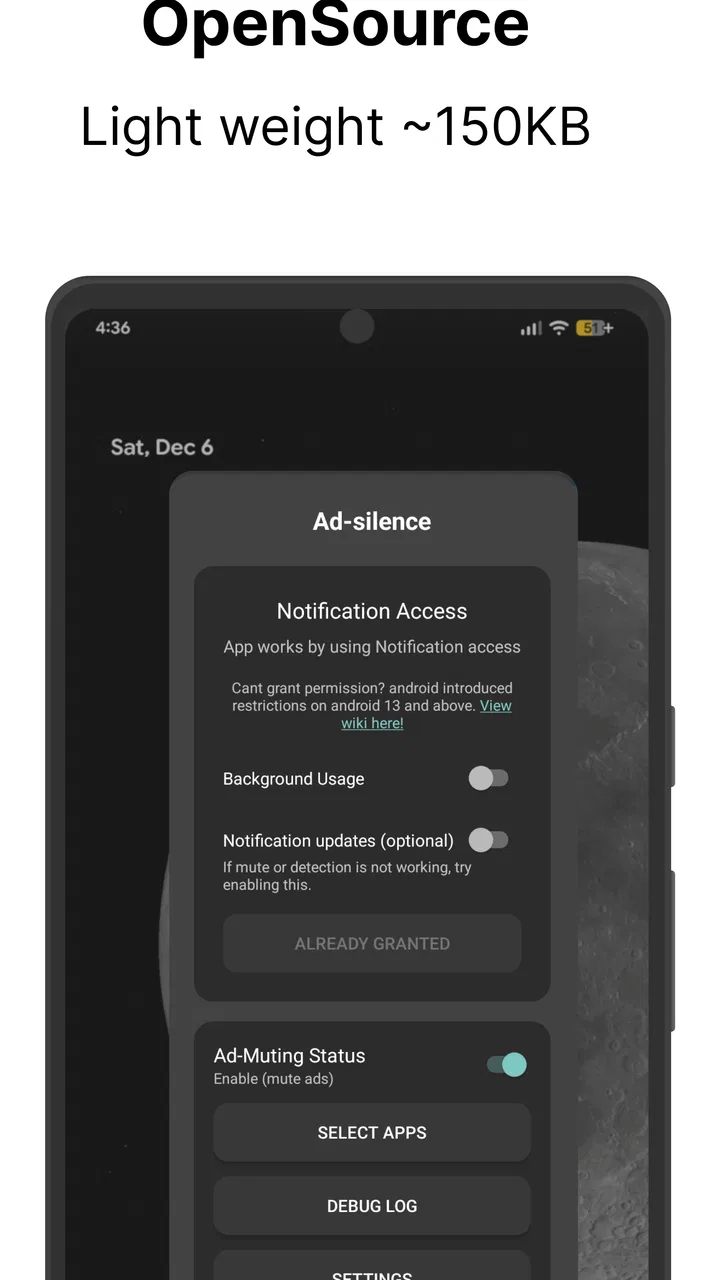
Ad-silence - OpenSource
- 3.8
- Rating
- 100.00K
- Installs
- Free
- Price

 Analysis by App-foxy
I tested Ad-silence - OpenSource in the kind of situation where its purpose makes immediate sense: a shared home with several people listening to different audio apps. One person may be using Spotify, another may prefer SoundCloud, and someone else might open Pandora or Accuradio. The problem is not choosing music; it is the sudden interruption when an advertisement starts playing from whichever app is active. This utility takes a focused approach by trying to mute those advertising moments across supported audio apps and other apps that produce sound.
That narrow purpose is also the key to understanding it. This is not a music service, a replacement player, or a tool for removing advertisements from every part of a phone. It is an audio-management app in the Libraries & Demo section, created by bluepie. I see it as a practical experiment for people who want fewer loud interruptions without changing their listening habits or paying for a separate subscription on every service.
The app is free and suitable for Everyone, which makes it easy to consider on a household device. It has reached over one hundred thousand installs and holds a 3.9 average from more than three hundred ratings. Those figures suggest a real audience, but they also tell me to approach it as a useful, situation-dependent tool rather than a flawless universal solution.
You May Also Like

 Google Keep - Notes and lists
Google Keep’s Quiet Growth Shows the Appeal of Simpler Notes
As mobile work gets busier, Google Keep keeps winning a simple contest: capture a thought quickly, find it later, and get on with the day.

 Blood Strike: 2.5 Anniversary
Blood Strike’s Loadouts Turn Every Drop Into a Tactical Gamble
A close look at Blood Strike’s custom loadouts: how fast access to signature weapons reshapes its battle royale rhythm, rewards preparation, and narrows the gap between fights.

 Pandora - Music & Podcasts
Pandora’s Music Is Easy to Start, but Harder to Recover
Pandora’s strength is its low-effort path from a seed to a station. Its weak spot is how much confidence it asks you to place in connection, setup, and quiet recovery.

 8 Ball Pool
 Is Built on Rivalries, Rematches, and Routine
A close look at the rivalries, rematches, shared routines, and unanswered safety questions that turn a quick pool match into a persistent mobile community.

 Samsung Music
’s Quiet Strength Is Playing What You Already Own
Its reach comes less from spectacle than from dependable access to a personal library. That simplicity is both the app’s strongest retention engine and its ceiling.

 AccuWeather: Weather Radar
AccuWeather Review: A Quick, Clear Forecast for Everyday Decisions
For everyday plans, the best forecast is the one you can understand quickly. AccuWeather makes rain timing, radar, and local conditions easy to act on, with a few trade-offs.
More From Our News Desk



How it fits into a shared household
A realistic example is a family room where a phone or tablet is connected to a speaker. A teenager starts a playlist, a parent later switches to a radio app, and another person opens a different audio service while cooking. With ordinary listening, each app handles its own advertising independently. That means the household has to tolerate interruptions, reach for the device, or stop what it is doing to skip or silence the sound.
Ad-silence is appealing because it works at the point where the annoyance is heard: the device’s audio output. Instead of asking every person to learn a new player, it aims to make existing apps more comfortable to use. That matters on a shared device because changing the main audio app can create more confusion than it solves. People already know where their playlists, stations, and saved tracks are.
In my view, the strongest use case is casual background listening. If music is playing while people clean, study, cook, or spend time together, a sudden commercial is disruptive even when nobody is actively watching the screen. A tool that reduces that interruption can make the device feel calmer without requiring everyone to agree on one service.
There is an important boundary, though. Muting an advertisement is not the same as removing it from the service. The app does not turn an ad-supported account into a premium account, and it does not make the underlying content free of advertising in every sense. The service may still count the ad as played, and the listener may experience a pause or a change in the audio flow. I would use this for convenience, not as a substitute for supporting a service through its official paid plan.
What the app is actually changing
The most useful way to think about the app is as an audio interruption filter. It is not curating content and it is not deciding which songs a household should hear. Its job is much smaller: when an unwanted advertising segment is detected or recognized in the supported listening flow, the sound can be silenced so the room is not filled with it.
That distinction helps set expectations for mixed household use. If one person wants to hear every spoken announcement from an internet radio station, while another wants a quieter background experience, the same behavior may not suit both listeners. A silence-focused tool can be welcome during work or sleep, but less desirable when the advertisement contains information someone deliberately wants to hear.
I also would not treat it as a universal answer for video, games, phone calls, or notification sounds. The store summary specifically points to Accuradio, Spotify, SoundCloud, Pandora, and any app as targets for muting ads, but “any app” should be read carefully. Audio behavior varies widely between apps, devices, operating-system versions, and playback methods. A service that inserts advertising in a predictable audio stream is a different challenge from one that mixes ads into video, uses unusual audio sessions, or changes its interface frequently.
Setting boundaries before other people use it
On a personal phone, it is easy to experiment privately. On a shared phone or tablet, setup deserves more thought because one person’s audio preference can affect everybody else. Before enabling it for the household, I would test it with the exact apps and speaker arrangement that people actually use. A result on headphones is not automatically the same as a result through a Bluetooth speaker or the device’s built-in speaker.
I would also establish a simple rule: the person using the device should know that audio advertisements may be silenced. That is especially important when the device belongs to more than one person. A parent may assume the radio is behaving normally, while a child may think the app itself has stopped working. Clear expectations prevent a technical behavior from being mistaken for a broken service.
The current version is v0.8.0-prod, which reinforces my cautious approach. I do not read that label as a reason to avoid the app, but I would expect some rough edges in a tool that interacts with many unrelated audio applications. If a household depends on uninterrupted audio for a gathering, presentation, or important announcement, I would keep a normal fallback ready rather than relying on this alone.
One practical tip is to test the app in stages. Start with one audio service, one output method, and a short listening session. Then try another service without changing several other phone settings at the same time. This makes it much easier to identify whether an unexpected pause comes from Ad-silence, the audio app, the wireless speaker, or the operating system.
Another useful boundary is to avoid judging the app from a single advertisement. Advertising formats can differ even inside the same service. Some may be easy to identify as a separate audio segment, while others may be delivered in a way that looks more like ordinary content. A few listening sessions across different apps provide a more honest picture than one successful or unsuccessful test.
Why the open-source angle matters here
The “OpenSource” identity is relevant for people who prefer tools with a visible, community-oriented character rather than a large commercial media ecosystem. It also makes the project feel more like a focused utility than a bundled entertainment product. For a household deciding whether to install an app that affects audio behavior, that distinction may be reassuring.
Still, open-source does not automatically mean effortless. The everyday experience depends on how well the app keeps pace with the audio apps it interacts with and how clearly it communicates when something is working. A technically interesting project can require more patience than a polished subscription feature. I would recommend it to someone comfortable with testing and adjusting expectations, not to a person who wants every audio source to behave identically without any troubleshooting.
The free price removes the biggest barrier to trying it. That is helpful when a family wants to see whether it fits its routine before committing money. It also changes the comparison with premium listening plans: Ad-silence may reduce a specific annoyance, while a paid plan usually changes the broader service experience with features such as official ad-free playback, account benefits, or additional controls. The better choice depends on whether the household wants fewer interruptions or a complete service upgrade.
Coordinating listening across different people
Shared devices often fail because nobody knows who is allowed to change what. Ad-silence does not solve household coordination by itself, so I would pair it with a simple usage agreement. Decide which person can enable or disable the audio behavior, whether it should remain active for background listening, and what to do when someone wants to hear a station exactly as its publisher intended.
This is particularly useful when a phone is passed between adults and children. A child may not understand why a spoken segment disappears, while an adult may not want unexpected advertising played aloud. The app can support a quieter environment, but the household still needs to explain what it does and why it is installed. That conversation is more important than any individual setting.
I would also separate personal accounts from shared-device expectations. If several people sign into their own services on the same device, the audio behavior may affect all of them while it is active. Nobody should assume that their account alone controls the result. The safest approach is to treat Ad-silence as a device-level listening choice and discuss it before switching between accounts.
A helpful workflow is to keep one ordinary listening method available. For example, a household might use the filter during chores or quiet evening listening, then turn to the official app behavior when someone wants announcements, live commentary, or a complete broadcast. This avoids forcing one setting to cover every context.
There is also a social advantage to testing it together. If a speaker suddenly becomes quiet, the people in the room can decide whether that is preferable or confusing. One person may appreciate the silence, while another may think the playback has stalled. Shared feedback helps determine whether the app improves the household experience or merely moves the annoyance from advertisements to uncertainty.
Where usual alternatives make more sense
The most obvious alternative is an official paid subscription. That route is usually better for a person who wants a formally supported, predictable, ad-free experience inside one specific service. It may also be preferable when the listener values uninterrupted playback more than experimenting with a separate utility. Ad-silence is more attractive when the household moves between several supported services and does not want to pay for each one.
Another alternative is using a single service with a free, ad-supported plan and accepting its normal behavior. This is simpler because there is no extra audio layer to test. The trade-off is that every advertisement remains part of the listening experience. For a personal phone used occasionally, simplicity may win; for a shared speaker that plays for hours, reducing interruptions may be worth the added setup.
Manual muting is the final basic alternative. It costs nothing and requires no additional tool, but it is inconvenient when nobody is near the device. It also creates an awkward household routine: someone has to notice the advertisement, find the phone, and lower the volume. Ad-silence is specifically more useful in hands-off situations, although its automation can be less transparent than pressing a mute button yourself.
Age, trust, and everyday reliability
The Everyone age rating makes the app approachable for a general household, but age suitability is not the same as independent use. Younger family members may need an adult to explain why audio changes or why an app that normally speaks suddenly becomes quiet. I would avoid presenting it as a secret way to alter another person’s listening. On a shared device, trust matters more than convenience.
For parents, the useful question is not whether the app replaces supervision. It does not. It does not create a family account structure, decide which content a child can open, or manage the rules of the audio services themselves. Its role is limited to the sound experience. Parents should still use the account and device settings provided by the relevant services and operating system when those controls are needed.
For older adults or less technical users, the main concern is explainability. “The app may silence advertising audio” is a simple explanation. “The app changes how several unrelated services behave depending on the playback method” is harder to communicate. If a household member would be worried by occasional silence, I would either demonstrate it first or leave the device on its normal configuration.
Privacy and trust also influence whether I would install it on a personal device. Any utility that interacts with audio playback deserves a careful look at its behavior and permissions during setup. I would not install it blindly on a phone used for sensitive work, and I would keep the app updated through the normal trusted distribution channel. The fact that it is free is convenient, but free should not mean automatic approval without understanding what is being enabled.
Reliability is best judged by routine rather than by a dramatic test. Use the same speaker, the same few apps, and the same type of listening that the household normally does. Notice whether playback resumes naturally, whether the device remains responsive, and whether people understand what is happening. If the experience produces more questions than relief, the official service option is probably the better fit.
Small habits that make the trial more useful
- Begin with background audio: use it during chores or casual listening before depending on it for a long shared session.
- Change one variable at a time: test a different app or speaker separately so problems are easier to trace.
- Tell every regular user: explain that advertising audio may be muted rather than assuming people will understand the silence.
- Keep an ordinary fallback: switch to the service’s normal playback when announcements or complete broadcasts matter.
- Review the arrangement after a few days: ask whether the household hears fewer interruptions or simply notices more unexplained pauses.
These habits reveal a trade-off that is easy to miss in a short store description. The app’s success is not only technical. It depends on whether the people sharing the device prefer quiet gaps to audible advertising and whether they can agree on one behavior. A single listener can make that choice alone; a household has to coordinate it.
My household verdict
I see Ad-silence as a focused, worthwhile experiment for people who regularly play audio from multiple ad-supported apps on a shared device. Its strongest point is convenience: it aims to reduce unwanted advertising sound without asking everyone to abandon the services they already know. The free price and Everyone rating make a trial easy, while the open-source identity will appeal to users who prefer a small, purpose-built project over another large media platform.
My recommendation comes with clear conditions. Test it with the actual apps and speakers in the home, explain its behavior to everyone who uses the device, and do not treat it as a replacement for official ad-free subscriptions or family-management tools. If a person needs guaranteed playback, formal support, or perfect compatibility with every audio format, a service’s own paid option is likely the safer choice.
For a household that mainly wants quieter background listening, however, the app can solve a very specific irritation. I would install it on a spare or shared listening device first rather than making it the hidden default on everyone’s personal phone. Used with that boundary, the best reason to try Ad-silence is not to change the music, but to make shared listening less disruptive.
FAQs for Ad-silence - OpenSource
01What is Ad-silence and how does it work?
Ad-silence is an open-source application designed to block intrusive advertisements on your device. It works by filtering out unwanted ads from web pages and apps, ensuring a smoother browsing experience. By using community-driven filter lists, it effectively reduces distractions and potential privacy threats without compromising the performance of your device.
02Is Ad-silence safe to use on my device?
Yes, Ad-silence is safe to use. As an open-source application, its code is publicly available for review, ensuring transparency and trustworthiness. The app does not collect personal data, which means your privacy is respected. Additionally, it’s regularly updated to address any security vulnerabilities or bugs.
03Will Ad-silence affect the performance of my device?
Ad-silence is designed to run efficiently without impacting your device's performance. By reducing the number of ads loaded on web pages and apps, it can actually enhance loading times and improve overall performance. It operates in the background with minimal resource usage, ensuring a seamless user experience.
04Can I customize the ad-blocking settings in Ad-silence?
Yes, Ad-silence offers customization options to suit your preferences. You can choose from various filter lists or even add your own custom rules. This flexibility allows you to block specific ads or websites as needed, tailoring the app to your specific browsing habits and requirements.
05Is Ad-silence compatible with all browsers and apps?
Ad-silence is compatible with most browsers and apps, but its effectiveness may vary depending on the specific platform or app architecture. While it works well with popular browsers like Chrome and Firefox, some apps may have built-in protections against ad-blocking. Users can regularly update the app to maintain compatibility and effectiveness.
Pros
- Open-source and free to use.
- Customizable ad-blocking settings.
- Lightweight and fast performance.
- No user data collection.
- Community-driven updates.
Cons
- Limited support for some apps.
- May require manual configuration.
- Not available on official app stores.
- Occasional false positives.
- Limited user interface design.

Ad-silence - OpenSource
Gallery